
Our pricing is usage-based, and you only pay for what you use.
Plans
We have two plans: Free and Pro.
The Free plan gives you 30 credits each month. If you use all your credits, you will need to upgrade to the Pro plan to continue using the application.
The Pro plan costs £10 per month and includes 60 credits. If you use all your included credits, you’ll be charged pay-as-you-go for each additional credit you use. The PAYG rate is £0.15 per credit.
Credits
Key actions such as creating projects, creating cables and printing reports cost credits. You can see a list of costs on the application’s “Account” page. You can view how many credits each action costs on the application’s Account page. Credit costs are automatically charged when you take the corresponding action.
Most other actions, such as editing projects or cables, are free and cost no credits. You can monitor your credit consumption on the “Account” page. Monthly included credits do not carry over.
Variable Costs: Some actions involve variable costs; for example, copying a project, where the total cost is the cost of creating a project plus the cost of creating each copied cable. Total costs are shown before you confirm any variable-cost action.
Included Credits
Free Plan: The included credits are sufficient to evaluate the application. We recommend creating a project, adding a cable to it (so you can see how the sizing works), and printing a Cable Sizing report. The Free Plan includes some in-app restrictions (single project with up to three cables, and report watermarks).
Pro Plan: The included credits offset the monthly subscription cost. These included credits allow a small project with two or three cables and a few reports; for more extensive needs, you will need to use PAYG credits.
What Pro costs in practice
Most users size between one and three cables. A typical small project costs £10 in total: setting up the project, adding and sizing three cables, and producing one Cable Sizing Report plus one Full Project Report uses 58 credits, so the completed work is covered by the 60 credits included in the Pro monthly subscription.
| Completed engineering work | Cost on Pro | Credits used |
|---|---|---|
| Single cable added to an existing project | Covered by included credits, or £0.90 after the included credits have been used | 6 |
| Typical small project: project setup, 3 cables and 2 reports One Cable Sizing Report and one Full Project Report | £10.00 total — covered by the Pro monthly subscription | 58 |
| Higher-use project: project setup, 10 cables and 4 reports Two Cable Sizing Reports and two Full Project Reports | £20.50 total | 130 |
| Substantial project: project setup, 30 cables and 6 reports Three Cable Sizing Reports and three Full Project Reports | £43.00 total | 280 |
These examples assume that all work is completed within one monthly billing period and that the account starts with all 60 included Pro credits available. Actual costs depend on the actions and reports selected. Prices exclude VAT.
How the examples are calculated
- Creating a project: 10 credits
- Adding and sizing a cable: 6 credits
- Cable Sizing Report: 10 credits
- Full Project Report: 20 credits
- Additional Pro usage: £0.15 per credit
For example, the higher-use project uses 130 credits. After the 60 included credits, 70 additional credits cost £10.50; adding the £10 Pro subscription brings the total to £20.50. Most subsequent work, including editing existing project and cable information, does not use credits. Ready to choose a plan? Compare Free and Pro pricing.
Budget
Light users may stay within the included credits, but most users will incur some PAYG charges. To prevent high costs, you can set a budget on the “Account” page. Once your PAYG charges reach this limit, the application will prevent additional charges.
Your budget defaults to zero. You will need to set a valid amount to go over the included credits.
Payment
At the start of your billing cycle, you will be charged the subscription fee for the coming month, plus any PAYG charges you accumulated during the previous month.
Invoice Example: During the month, you have used 160 credits. The first 60 credits are included in the plan, with the remaining 100 credits resulting in a PAYG charge of £15.00. On your billing date, you will be invoiced £10 for the upcoming month’s subscription plus the £15.00 PAYG balance, for a total of £25.00.
You can manage your subscription and monitor your credit usage on the ‘Account’ page. See our account page for details.
Shared Billing
You can invite people to use myCableEngineering with their usage billed to your account. This is ideal for companies who need a central billing account and wish employees to sign in with their own email.
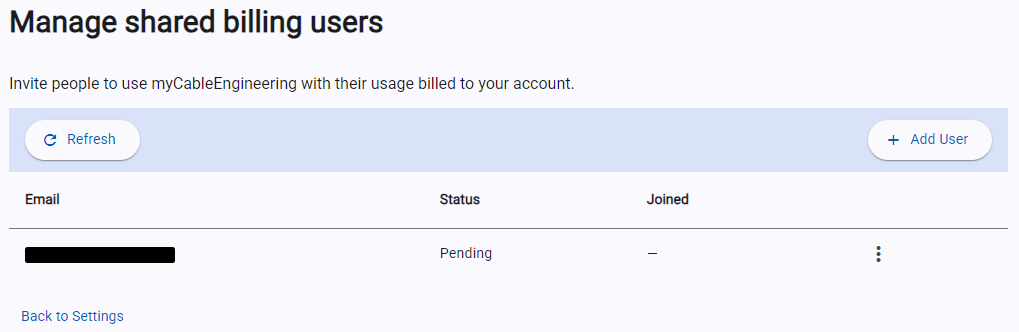
To set up shared billing, go to “Settings” and in the “Shared billing” section click “Manage Users”. From here, you can invite, cancel invites, and remove users. Once a user accepts the invitation, you can view their usage and billing costs using the “View Usage” button.
Tip: Invited users will see your display name. Set this to your company name.
When users receive an invitation, they can accept or decline. After accepting, their billing will be sent to the shared billing account. Users can remove themselves from shared billing at any time.
In shared billing, users’ projects and project-sharing permissions remain separate.
Refunds & Compensation
Refunds
Except where required by law, purchases and subscription payments are non-refundable.
Our Free plan allows you to evaluate the application before subscribing. We recommend using the Free plan to confirm the application meets your requirements before purchasing a subscription.
Credit Loss
Most reported cases of apparent credit loss are caused by issues outside the application, such as browser, device or local configuration problems. For example, generated reports are downloaded through your browser and are normally saved to your Downloads folder. If your browser or system configuration prevents the application from operating as intended, we will provide reasonable assistance to help identify and resolve the issue. However, we do not provide compensation for credits used as a result of such problems.
We will consider compensation for lost credits where we determine that a fault or bug in our software caused the loss. We will provide any compensation as an account credit rather than a monetary refund. Account credits may be applied against accumulated pay-as-you-go consumption charges, but will not replace or offset any included free credits.